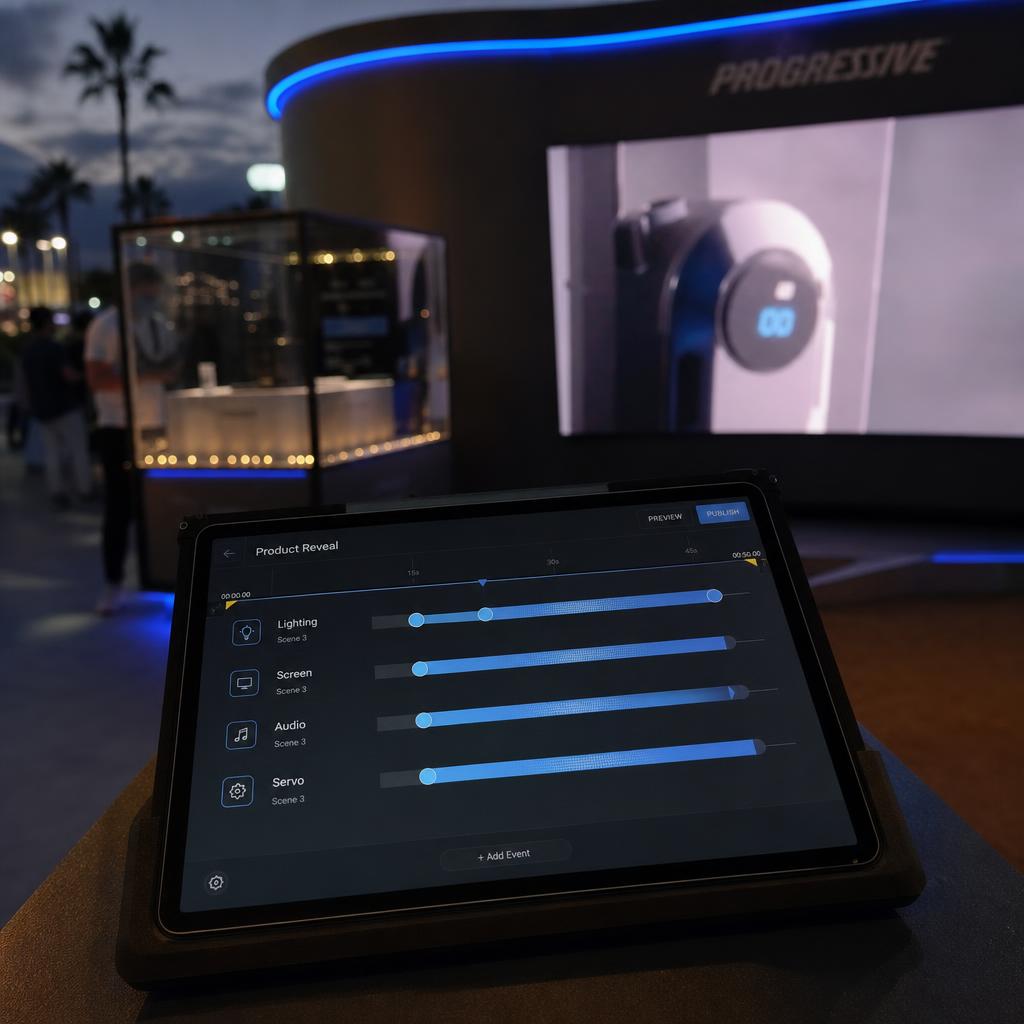
What Is a Multi-Environment Controller?
A multi-environment controller is software that coordinates screens alongside the other physical systems in a space, from a single control layer with shared triggers and shared timing:
- Lighting
- Audio
- Sensors
- Relays and servos
- Door locks
A conventional digital signage CMS only knows about screens. It schedules playlists and reports on-screen status, but has no concept of a light fixture or a sensor.
So if a venue wants a screen to change content at the exact moment a light dims and a speaker starts an audio cue, a screen-only CMS cannot do that alone.
A multi-environment controller closes that gap by treating "what happens" as a single event that can touch any connected device type.
It sits above two layers at once, so both can be driven by the same trigger:
- The IoT device layer — sensors and controllers speaking MQTT, DMX or GPIO/relay signals
- The display layer
The term is not industry-standardised. Vendors also call it "unified environment control", or fold it into "smart venue" language. The functional definition holds either way: one system, multiple device categories, coordinated output.
This matters most where the screen is one part of a larger physical experience — retail activations, museum exhibits, branded showrooms, corporate briefing centres, and immersive event spaces. In a standard office lobby or QSR menu board network, a screen-only CMS is still the right tool.
The Signals a Multi-Environment Controller Has to Handle
- Time-based triggers — scheduling logic extended to fire lighting scenes and audio cues on the same clock.
- Sensor-based triggers — a motion sensor, door contact, pressure mat or RFID reader starting a sequence without a human pressing a button.
- Manual/operator triggers — a staff member firing a scene from a tablet, common in briefing centres and live events.
- API/external triggers — a booking system or POS event firing a scene programmatically.
- Device-state triggers — one device's state change causing another to react, such as a servo reaching position before a screen advances.
The controller normalises all of these into one event model, so a designer building a sequence only needs to know what should happen next, not whether the trigger was a clock, a sensor, or a person.
How Scene-Based Control Works
The mechanism most multi-environment controllers use is the scene — a named, pre-built bundle of instructions spanning every connected device category at once. Rather than scripting a one-off sequence each time, an operator builds the scene once and calls it by name or trigger.
SPARC's Scene System works this way. A single scene can hold all of these, fired as one unit with defined timing offsets between steps:
- Screen content changes
- LED strip colour and brightness
- Audio playback
- Servo movement
- Door lock states
A "welcome" scene for a retail activation, in order: dim the ambient lighting, bring an LED accent strip up in brand colour, start the screen sequence, unlock the display case servo. Together.
A venue manager doesn't need to understand DMX addressing to run the space day to day — they pick "Evening Mode" or "Product Launch" from a list, and the controller handles the underlying protocol per device. Scenes can be layered, so a base ambient scene runs continuously while an interaction-triggered scene overrides it temporarily.
The Hardware Layer Behind an IoT Signage Controller
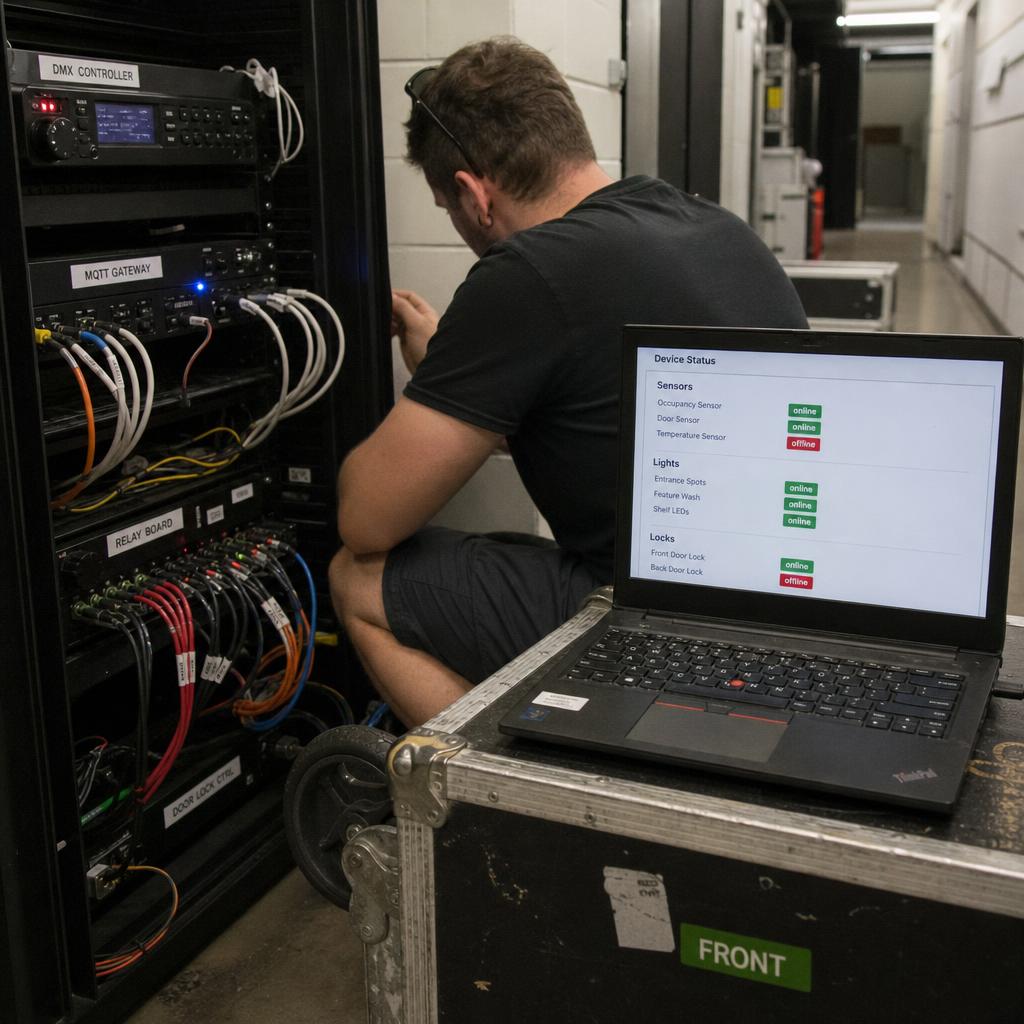
None of the above works without a hardware layer that can speak to lighting, sensors and actuators. This layer is built from a mix of:
- Media players/screen controllers — still required for the display side.
- Relay and GPIO controllers — simple on/off switching for door locks, solenoids, or single-function motors.
- DMX controllers — the standard protocol for stage and architectural lighting.
- Sensor gateways — hardware that reads PIR, contact or RFID sensors and passes state back over MQTT.
- Servo and motor controllers — for physical movement, typically needing position feedback.
This is the layer SPARC's hardware control feature is built to manage. Worth being clear-eyed about as a buyer: this hardware has to be installed and network-addressable before any software layer can control it — a multi-environment controller coordinates connectivity that already exists, it doesn't create it.
Screen-Only CMS vs Multi-Environment Controller
| Capability | Screen-only CMS | Multi-environment controller |
|---|---|---|
| Screen content scheduling | Yes | Yes |
| Lighting control | No | Yes |
| Audio playback coordination | Limited | Yes, independently addressable |
| Sensor-triggered actions | Rare | Core capability |
| Servo/actuator/lock control | No | Yes |
| Cross-device scene bundling | No | Yes |
| Typical setup complexity | Low | Higher |
| Typical venue fit | Retail chains, QSR, lobbies | Activations, exhibits, showrooms, events |
This is a scope comparison, not a quality one — a screen-only CMS isn't inferior, it's built for a narrower job. A multi-environment controller needs defined fallback behaviour for what a scene does if one device doesn't respond while others still fire.
Do You Need a Multi-Environment Controller?
Standard signage network — retail menu boards, corporate lobby screens, wayfinding. A screen-only CMS is right. See SPARC's core platform.
Branded activation, showroom or experiential retail space. This is the core multi-environment use case. Start with an environment control platform.
Museum, gallery or education exhibit with interactive elements. Sensor-triggered scenes are usually the deciding factor.
Live events or briefing centres with operator-run sequences. You need manual scene triggering as much as automated triggers.
Not sure yet. List every device category the space will contain. If it is screens only, a screen-only CMS is simpler to deploy and simpler to troubleshoot.
That last line is the honest answer for most buyers. A multi-environment controller earns its place when lighting, audio or sensors have to move in step with the screens. If nothing else in the room needs to change when the content does, you are buying complexity you will spend a year working around.
If your space does have more than screens in it, book a demo and we will build one scene against your actual devices — screens, lighting and audio changing together — rather than describing it.
Planning a Multi-Environment Rollout
Device inventory has to happen before software selection — every light, sensor, servo and lock needs to be confirmed network-addressable and matched to a protocol before committing to a controller.
Scene design should be its own design pass, separate from content design — mapping out, device by device, what each scene does, in what order, and what happens if one device doesn't respond.
Network segmentation matters more than in a screen-only deployment, since IoT control traffic and media playback traffic have different reliability profiles.
This is a category worth adopting deliberately: if a space's screens don't need to talk to anything else, an environment control layer isn't buying anything. See how a real-time screen controller handles device status and content push, since that layer still needs to work reliably before layering environment control on top.
Multi-environment controller FAQs
What's the actual difference between a screen controller and a multi-environment controller?
A screen controller manages content scheduling and playback on displays only. A multi-environment controller does that plus coordinates lighting, audio, sensors, servos and locks through shared triggers and scenes, so a single event can change what's on screen and what a light or speaker is doing at the same moment.
Do I need IoT hardware already installed before I can use a multi-environment controller?
Yes. The software coordinates devices that are already network-addressable — it doesn't create that connectivity. Hardware scoping has to happen before or alongside software selection.
What protocols does a multi-environment controller typically need to support?
Commonly DMX for lighting, MQTT for sensor and device messaging, and relay/GPIO for simple on-off devices. The controller translates all of these into one event model.
Can scenes run automatically as well as be triggered manually?
Yes — scheduled, sensor, API and manual triggers can all be supported, often layered, with a base ambient scene running continuously and an interaction-triggered scene temporarily overriding it.
Is multi-environment control only useful for large venues?
It's driven by device variety, not venue size. A small retail activation with one screen, one LED strip and one motion sensor is still a multi-environment use case.
What happens if a sensor or light goes offline mid-scene?
This needs defined fallback behaviour in the controller — for example, letting the scene proceed on responding devices while flagging the offline one, rather than the whole scene stalling.
Ready to Experience SPARC?
Join forward-thinking organizations already using SPARC for their digital signage needs.